Direct-to-shard queries
PgDog has a powerful parser that can extract sharding hints directly from SQL queries. Queries that refer to a column in one of the sharded tables are sent directly to the corresponding database in the configuration.
Direct-to-shard queries are foundational to horizontal database scaling. The more queries that can be routed to just one database, the more requests the entire sharded database cluster can serve.
How it works
Under the hood, PgDog uses the pg_query library, which provides direct access to the native PostgreSQL parser. This allows PgDog to read and understand all valid SQL queries and commands.
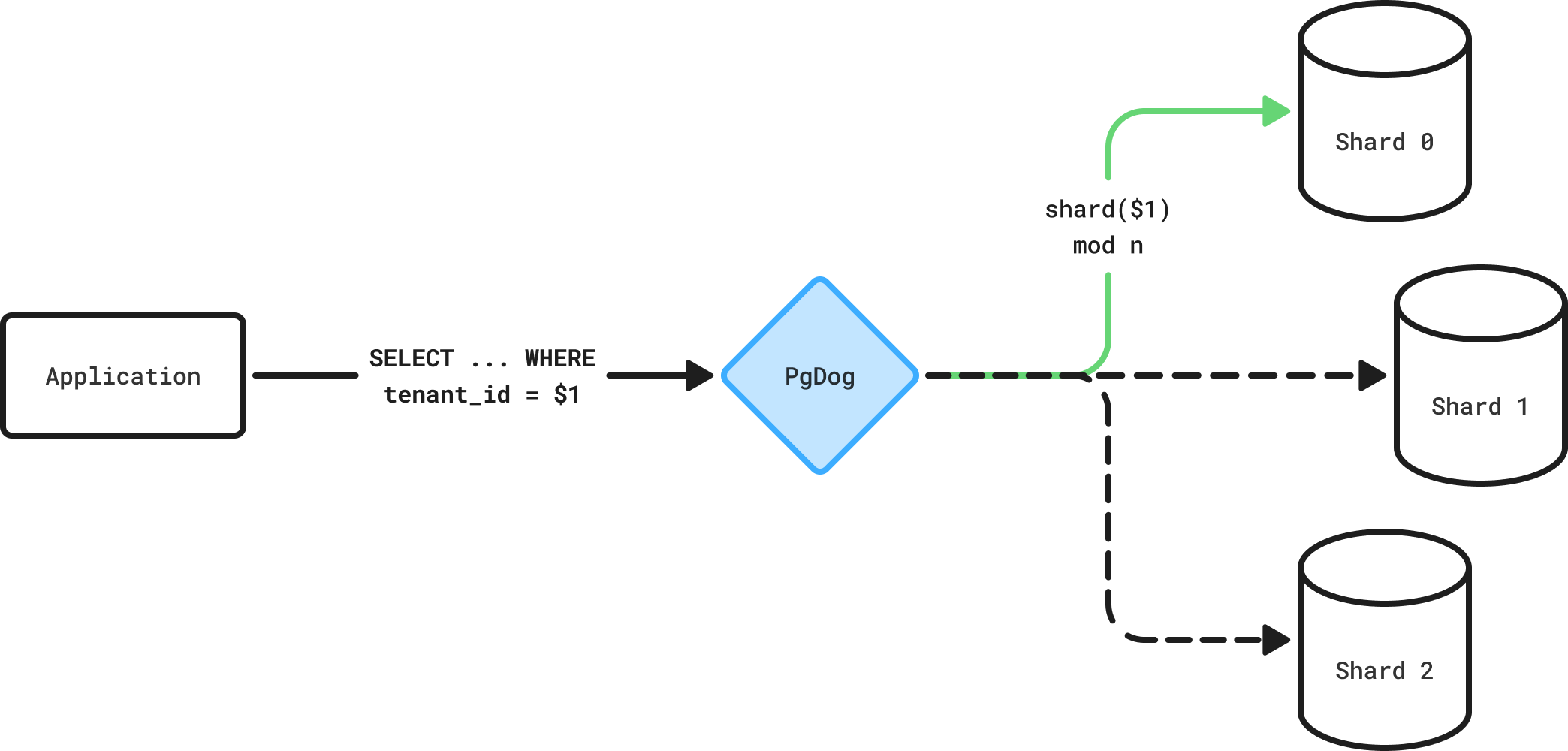
Direct-to-shard queries go to one shard at a time.
PgDog is deployed as a proxy between Postgres shards and the application, and takes care of routing queries between them. Each SQL command is different and is handled differently by the query router, as documented below.
SELECT
To route SELECT queries, the query router looks for a sharding key in the WHERE clause. For example, if your database is sharded by the user_id column, all queries that filter rows by that column, either directly or through a foreign key, can be sent to a single shard:
SELECT * FROM payments
INNER JOIN orders
  ON orders.id = payments.order_id
WHERE
  payments.user_id = $1; -- Sharding key.
Both regular queries and prepared statements are supported. If your database driver uses placeholders instead of actual values, PgDog will extract the sharding key value from the extended protocol messages.
The sharding key doesn't have to appear in the top-level statement: PgDog's parser will recurse into subqueries and CTEs, if any, and find all matching filters. For example:
Supported syntax
The SELECT query can express complex filtering logic, and not all of it is currently supported. The following filters in the WHERE clause will work:
| Filter | Example |
|---|---|
| Column equals a value | payments.user_id = $1 |
| Column matches a list | payments.user_id IN ($1, $2, $3) |
All other variations will be ignored and the query will be sent to all shards.
Query router improvements
This is an area of constant improvement. Check back here for updates or create an issue to request support for a particular filter or query you are using.
If the query has multiple sharding keys, all of them will be extracted and reduced to a set of unique shard numbers.
For example, when filtering by a list of values, e.g., WHERE user_id IN ($1, $2, $3), the query will be sent only to that shard if all values map to a single shard. If they map to two or more shards, it will be sent to all corresponding shards concurrently.
INSERT
Insert queries are routed using the values in the VALUES clause, for example:
If the query is inserting a row into a sharded table, the query router will extract the sharding key and route the query to the corresponding shard. As with SELECT queries, both prepared statements and regular queries are supported.
Supported syntax
PgDog can automatically detect the sharding key in an INSERT statement, whether it specifies column names or not. This works because PgDog fetches the table definitions at proxy startup and knows which columns a particular table contains:
-- user_id is the sharding key ($1).
INSERT INTO payments (user_id, amount) VALUES ($1, $2);

-- user_id is automatically detected as parameter $1
-- using the table schema.
INSERT INTO payments VALUES ($1, $2);
If an INSERT statement contains multiple tuples, PgDog can rewrite it into separate statements and send them concurrently to their respective shards. This feature is still experimental and disabled by default. You can enable it in pgdog.toml:
Once enabled, PgDog will transform multi-tuple queries automatically and send them to their respective shards, for example:
Subqueries and CTEs
Not supported yet
Subqueries and CTEs are not presently supported for sharded INSERT statements.
Currently, subqueries fetching data from other shards are not supported in INSERT statements. For example, the following pattern will not work with PgDog:
This is because PgDog needs to split up the execution of these statements and execute them separately, injecting the results for the second statement into the first. This feature is on the roadmap and will be added soon.
UPDATE and DELETE
Both UPDATE and DELETE queries work similarly to SELECT queries. The query router looks inside the WHERE clause for sharding keys and routes the query to the corresponding shard, for example:
If no WHERE clause is present, or if it filters on a column not used for sharding, the query is sent to all shards concurrently, for example:
UPDATE users SET banned = true WHERE created_at <= NOW(); -- Not a sharding key.
UPDATE users SET banned = true; -- Missing WHERE clause.
Sharding key updates
Unlike Citus, PgDog supports mutating a sharding key column with an UPDATE statement. Under the hood, it will move the row between shards, deleting it from the original shard and inserting it into the new one. See sharding key updates for more details.
Foreign keys
While it's best to choose a sharding column that's present in all tables, it is sometimes not desirable or possible to do so. For example, it's redundant to store a foreign key in a table that has a transitive relationship to another table:
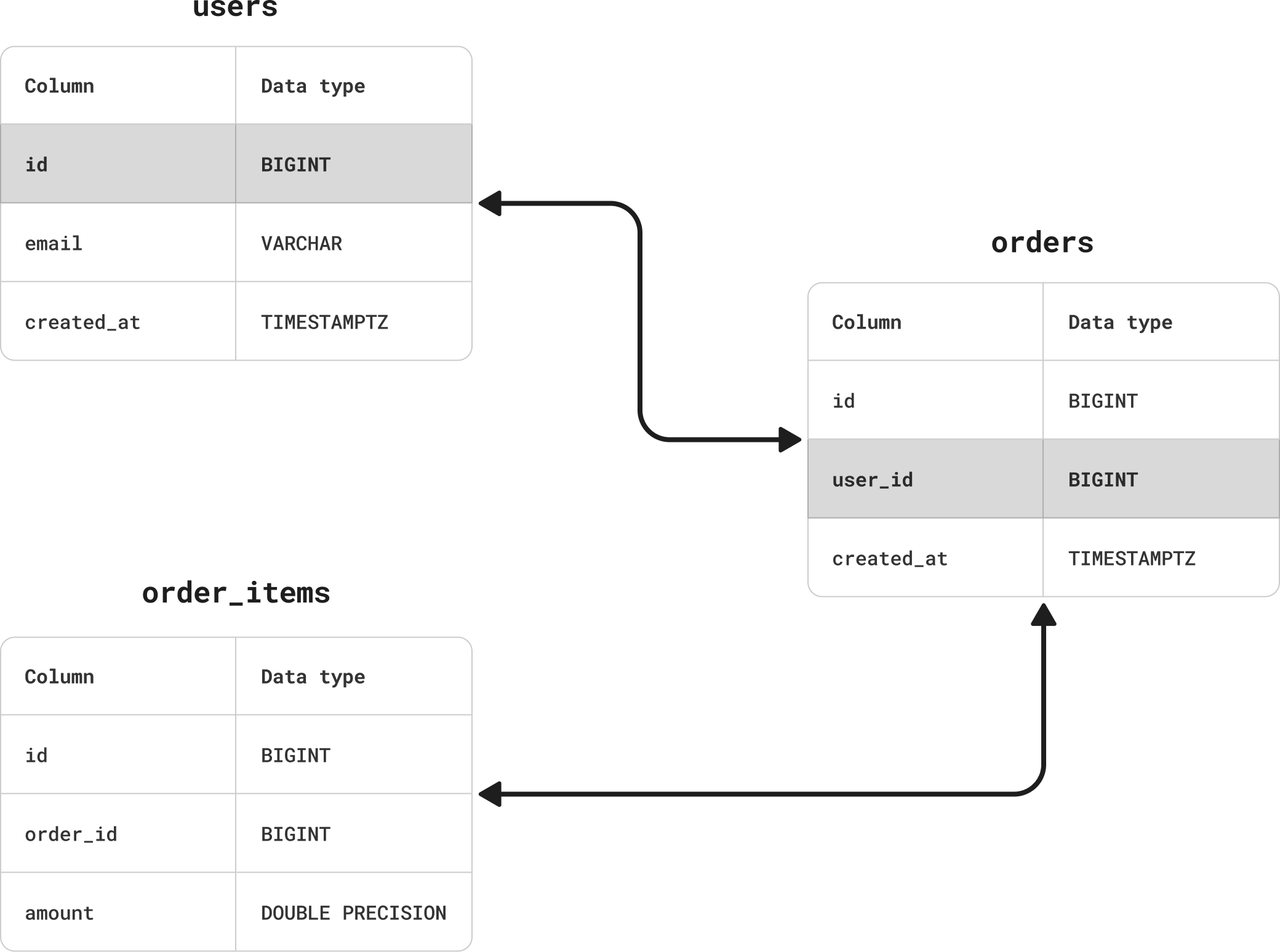
Transitive foreign key relationships require special handling.
In this example, the order_items table has a foreign key to orders, which in turn refers to users. This makes order_items related to users as well, but it doesn't need a foreign key to that table. However, this also means the table doesn't have its own sharding key.
To make querying the order_items table in a sharded database possible, the following workarounds are available:
| Workaround | Description |
|---|---|
| Add the sharding key column | Add the sharding key column to the table and backfill it with corresponding values. |
| Manual routing | Provide sharding hints to the query router via SQL comments or SET commands. |
| Use joins | For SELECT queries only, refer to the table as part of a join to another table that has the sharding key column. All other queries, e.g., INSERT, DELETE, etc., would need to use manual routing. |
Adding the sharding key column is often the best choice because it makes writing queries much easier. The sharding key is usually a compact data type, like a BIGINT or a UUID, so it doesn't take up much space and can be backfilled relatively quickly.
Backfilling
If backfilling the sharding key column, make sure to do so in small batches to reduce the impact on database performance.
Sharding configuration
If most or all of your tables have the sharding key and the column name is the same, you can add it to pgdog.toml without specifying a table name, for example:
This will match all queries referring to all tables with the user_id column and route them to a shard accordingly.
For the table storing the actual data referred to by the foreign keys, you can add another entry to the configuration, this time with the table name explicitly stated:
The second entry will match queries referring to the users.id column only. Together with the user_id entry, all tables that contain the sharding key will be supported by the query router for direct-to-shard queries.
Read more
Cross-shard queries
Run queries that span multiple shards transparently.
Manual routing
Explicitly control which shard handles a query.